>> To save a chart
➢ In the "Selected Charts" pane click on the Save button for the chart you want to save - see below.
|
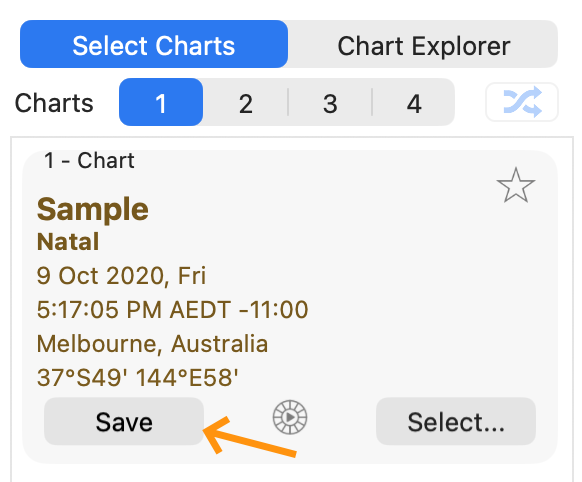
This will bring up a dialog box where all the available chart files are displayed inside the Astro Gold folder. All chart files end in the file extension .SFcht (see below).
[see Chart Files and computer Folders for detailed information on what chart files and computer folders are, how they are related, and how they work together]
|
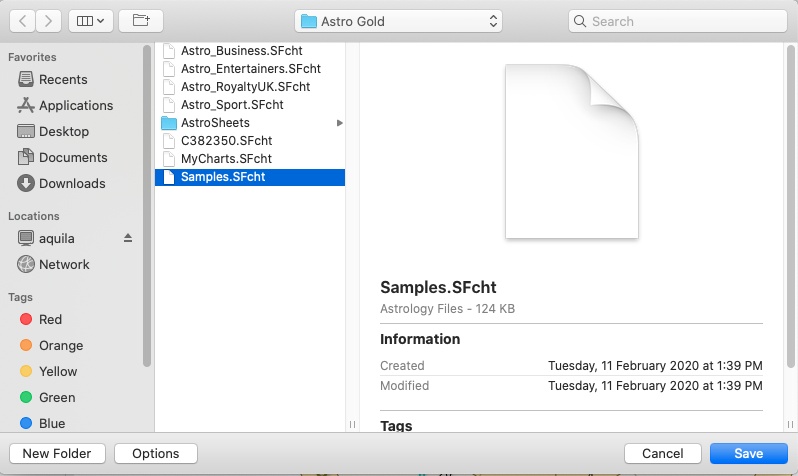 Saving a Chart into a chart file |
Finding (or creating) the folder where the chart file is
1)If the chart file you want to save the chart to, is in the available chart files that are displayed in the dialog above, go to step 3.
2)If instead you want to save the chart to file in a different folder other than the Astro Gold folder, then use the drop down box in the middle of the top of the dialog, to select any folder on the hard drive to save the chart to. Any chart files in the newly selected folder will be then be displayed similar to above. You can now go to step 3.
-OR-
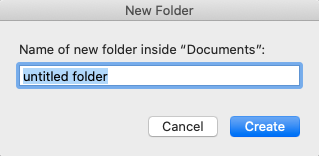
If you want to create a new folder inside the Astro Gold folder, then click on the New Folder button in the bottom left of the dialog. Another dialog box will be displayed in which you can type the new folder name. Once you have created the new folder click on the Save button again, and the folder will now be listed with the charts (and any other folders) in the main Astro Gold folder.
 |
Finding (or creating) the chart file to save the chart to
3)Now that you are located in the folder where you want to save your chart either:
a)Click on the chart file you want to save the chart to, which will select it (the file name will become highlighted).
-OR-
b)Create a new chart file by clicking on the Options button in the bottom left corner of the dialog. This will display a button called Create New Chart File, which you can click on. Another dialog box will pop-up in which you can enter a name for the new chart file. Clicking on the Create button will create a new empty chart file in the currently selected folder. Click on this new chart file to select (highlight) it.