|
 |
Colors
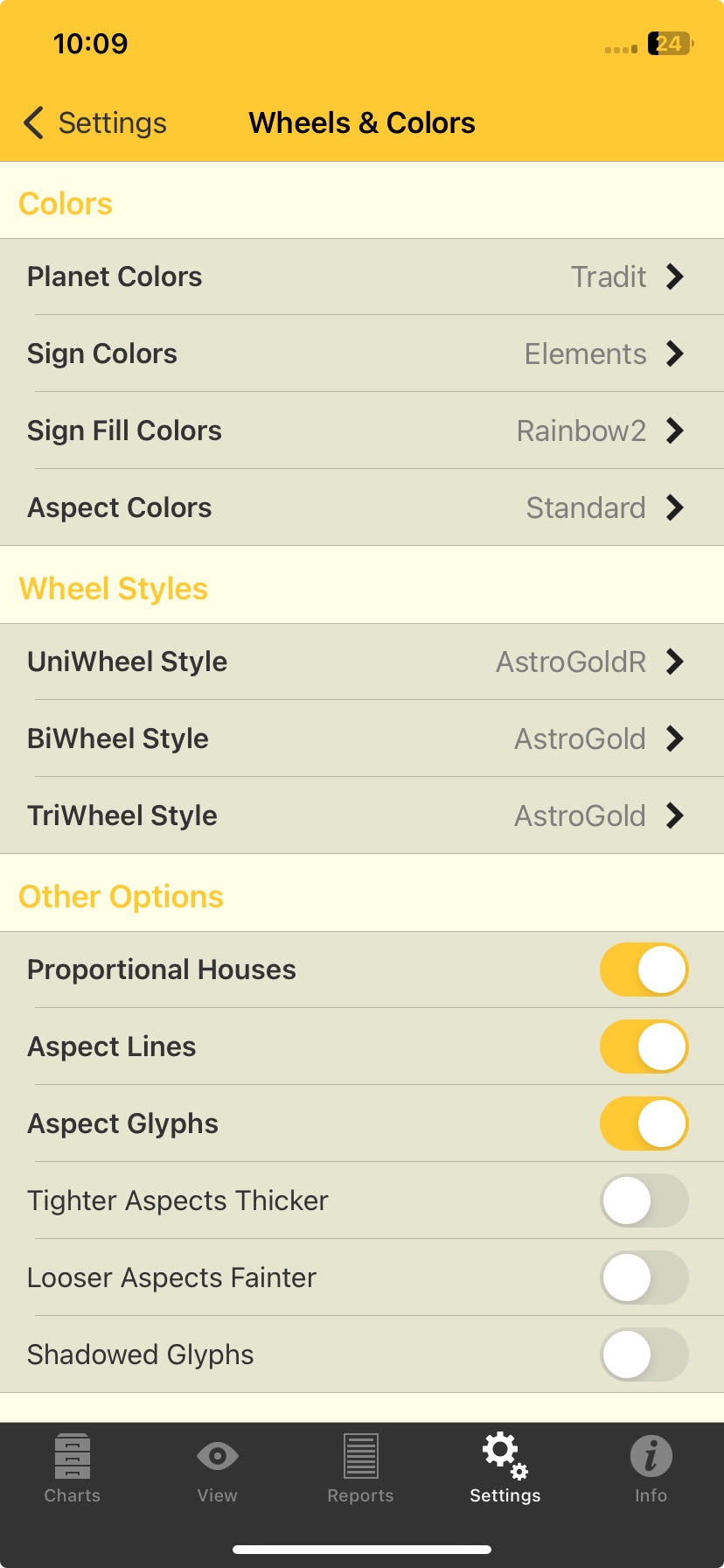
The colors for chart components - planets, signs, sign fills and aspects - all work the same.
To set the color for a component tap on the > icon on the right of the component. This opens a screen for selecting the color set for the component, with all possible color sets in a list. Simply tap on the color set you want - it will be selected and you'll be returned to the Wheels and Colors screen.
When you explore the options for wheel styles (UniWheel, BiWheel or TriWheel) in the "Wheels & Colors" screen above by tapping on the > icon to the right of each wheel style, you can see Astro Gold comes with various different wheel styles for you to choose from in each category.
The wheels are named in a fairly self explanatory way to describe what they are designed for, or to do.
If you want to see the retrograde symbol in a single chart wheel then choose UniWheel AstroGoldR.wh1.
Likewise if you also want to see it in BiWheels choose BiWheel AstroGoldR.wh2.
Note: due to limited space available when displaying TriWheels, there is no TriWheel design that displays R (retrograde) symbols.
UniWheels
Further explanation for some of the UniWheels ...
DecRuler.wh1: shows the Decanate rulers
SgnRuler.wh1: shows the Sign rulers
TermsPtol.wh1: shows Ptolemaic term rulers
TermsEgyp.wh1: shows Egyptian term rulers
Add visual depth to your charts by using the UniWwheel styles DecTermsEgyp.wh1 and DecTermsPtol.wh1. These designs include outer rings showing Decan and Terms rulers, using Egyptian and Ptolemaic systems respectively.
There are wheel styles for single charts (in the UniWheel Style options) that can display Decanate and Sign rulers for the chart planets, plus the Terms for the chart (see here for info on Terms).
BiWheels
The biWheels available are:
•AstroGold - this is the standard wheel: medium ring linewidth; the outer two rings contain the house cusps; retrograde planet degrees/minutes are in red.
•AstroGoldR - this is the modified standard wheel: medium ring linewidth; the outer two rings contain the house cusps; retrograde planets have the retrograde symbol (Œ) - so the planet glyphs and degree/minute text are necessarily smaller.
•BiEuro - thin ring linewidth; on the outside of the two wheels there is a zodiac band; retrograde planet degrees/minutes are in red.
•BiInnerAsp - if you have aspect lines turned on () the inner chart's aspects are drawn as aspect lines.
•BiInterAsp - if you have aspect lines turned on () the aspects between the inner chart and the outer chart (only) are drawn as aspect lines.
•DualHouse - a zodiac band separates the inner chart from the outer chart; the inner chart's house cusps are drawn from the inner most ring out to the zodiac band stopping there, and the outer charts house cusps are drawn from the zodiac ring out to the outermost ring containing the entire BiWheel.
•TMann - a zodiac band separates the inner chart from the outer chart; the inner chart's house cusps are drawn from the inner most ring out to and through the zodiac band to the outermost ring containing the entire BiWheel, with house cusp annotation where the house cusps connect with the outermost ring.
•Transits - this is comprised of a Uni1.wh1 UniWheel with the transiting points displayed around the outside of the UniWheel; the chart in the UniWheel shows retrograde planets in red degrees/minutes while the retrograde symbol (Œ) is used for the transiting planets.
Other Options
These are all simple on/off switches for each option. Pressing down on the white circular slider drag it right to turn the option ON (it goes yellow) or left to turn the option OFF (it goes a light gray).